
Nemeton
BetaBuilt for companies: AI gets work done in macOS VMs — via MCP, API and a built-in AI assistant
Give AI a Mac of its own to work in.
Claude Code, Cursor or your own agent get work done in fresh macOS VMs on Apple silicon, without touching your Mac. You start, watch and operate the sessions; a snapshot rolls back any state. Built for companies that want to hand work to AI.
- Takes orders from your AI assistant. Claude Desktop, Claude Code, Codex CLI, VS Code and Cursor work directly with the app via the Model Context Protocol (MCP). Plus a REST API for your own scripts.
- Your data stays on your Mac. Your VMs run entirely on your Mac. Local models via Ollama can be connected.
- A vendor you can look up. Developed and supported by Juergen Koller Software GmbH in Heilbronn; support in English and German.
Beta users: claim your full version
Register for free in the app by December 15, 2026 and confirm your email address: the full version 1.x, Pro included, is then yours for personal use. Signing up here is optional, we'll be in touch at launch.
Currently not available to buyers in the United Kingdom.
Description
Screenshots
What's New
Build 173 • Switch a VM's microphone on via MCP and REST as well • Mac sleep: VMs on external drives are frozen first, and Nemeton reports a lost drive • Speaker like microphone: mute can be set while the VM is starting, on is green, off is red • Claude Code in the VM: sign-in with a long-lived OAuth token as well • After "Load update" Nemeton quits again
Build 169 • Claude Code in the VM: start and control it directly in your macOS VMs (beta) • AI agent: its own toolbar button, progress in the agent window • Terminal sessions in the guest: open, read, write and resume via REST and MCP • Freeze on quit: running macOS VMs resume exactly where they were on the next start • Files out of the VM: drag onto "To Host" and the file lands in "Downloads" • Toggle the VM's microphone and audio with one click in the sidebar • The Mac's camera in macOS VMs, switchable per VM • "Import Mac…" creates a macOS VM that starts with Migration Assistant • USB image drives are writable, e.g. as a Time Machine target
Features
MCP Interface
Over 200 tools for Claude Desktop, Claude Code, Cursor and any MCP client: control VMs, snapshots, shell in the guest, files, dialogs, accessibility tree.
Built-in AI Assistant
Nemeton Cloud, your own key (Anthropic, OpenAI, Google) or Ollama locally. Four approval levels — destructive steps ask first.
Claude Code in the Guest (Beta)
Start, read, operate and run Claude Code sessions in parallel inside the macOS VM. You watch live in the guest.
Bridge Automation
Signed helper app in the guest: commands, files, clipboard, logs, answer dialogs, grant permissions, install 43 apps without an Apple ID.
REST API
With OpenAPI documentation, WebSocket, SSE and webhooks. Also on the LAN — with token and TLS.
Snapshots and Freeze
Copy-on-write on APFS, rollback via snapshot. Frozen VMs survive restarts of Nemeton and the Mac.
Linux and macOS
Ubuntu, Debian, Fedora, Arch with ISO download; macOS on Apple Silicon with IPSW download. Camera, microphone, USB drives.
Local and Private
Apple's Virtualization.framework, no analytics or advertising services. With Ollama even the AI stays on your Mac.
Privacy & Security
Local Execution
All VMs run locally on your Mac; their disk images do not leave it. No analytics, tracking or advertising services. Nemeton connects to our servers for updates, product status and licence checks. During the beta the app also reports the computer name, app and macOS versions, and the name and state of your macOS VMs to our support backend every minute; this is always on during the beta. Screens of macOS VMs are recorded locally in encrypted form, and support can request excerpts, during the beta without asking you first. After five days Nemeton needs a free account; for this the app transmits your email address and, when unlocking, a device ID. Your VMs stay on your Mac. The privacy policy inside the app lists every connection. The optional AI agent only transmits data when you use it.
Frequently Asked Questions
Can I create macOS VMs?
Yes, on Apple Silicon. Linux VMs on both Intel and Apple Silicon.
Does Nemeton replace Parallels or VMware?
For macOS VMs, yes — Nemeton uses Apple's native Virtualization.framework, no third-party software needed. There are no Windows VMs. Nemeton is built for companies that let AI handle their workflows – each in its own isolated VM.
How do I connect Claude Desktop or Claude Code via MCP?
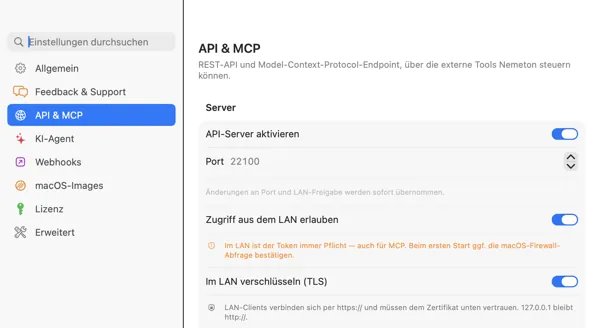
Enable the API server under Settings › "API & MCP". To connect Claude Code on the same Mac, run this in the terminal: claude mcp add --transport http nemeton http://127.0.0.1:22100/mcp (port configurable). For Claude Desktop and for computers on the LAN, copy the ready-made configuration from "API & MCP"; on the LAN the connection uses a token and TLS. Any MCP client that speaks HTTP can connect — the tools show up there automatically.
Is it a subscription?
Not during the beta – and if you register for free by December 15, 2026, and confirm your email address, the full version 1.x, Pro included, is yours for personal use. Businesses will use Nemeton with a subscription; businesses that register by then get the first year for free. Nemeton Cloud, the AI assistant via our server, is a separate subscription (EUR 14.99 per month or EUR 149.99 per year, incl. VAT for customers in the EU; no German VAT outside the EU). With your own API key or locally with Ollama you use the assistant without a subscription.
What does Nemeton cost for businesses?
Businesses use Nemeton with a subscription. We are putting the business subscription together right now and are happy to discuss price and scope with you in person. Book a call: calendly.com/jks1/30min – or write to us: juergenkoller.software/en/contact.html. Businesses that register by December 15, 2026 get the first year for free. Nemeton Cloud (EUR 14.99 per month) is the subscription for the AI assistant, not a business licence.
What do I get as a beta tester?
The full version 1.x, Pro included, for free for personal use, if you register in the app by December 15, 2026, and confirm your email address. Nemeton runs five days without an account; after that your email address is all it takes. Sign in with Apple is coming. In return, we'd love your opinion, easiest through the feedback option in the app. Businesses use Nemeton with a subscription and get the first year for free if they register by then.
Which Linux distributions are supported?
Ubuntu, Debian, Fedora and Arch Linux with automatic ISO download.
Which macOS version is required?
macOS 15 Sequoia or later.
Goes well with
 FreezeTextYou cannot copy out of a VM window. FreezeText freezes the screen and recognizes the text via OCR — error messages and console output from the VM end up in your clipboard.View product page
 InkraSetups, snapshots, commands: Inkra is a native Markdown editor with an AI assistant for the notes every VM leaves behind.View product page